What it is
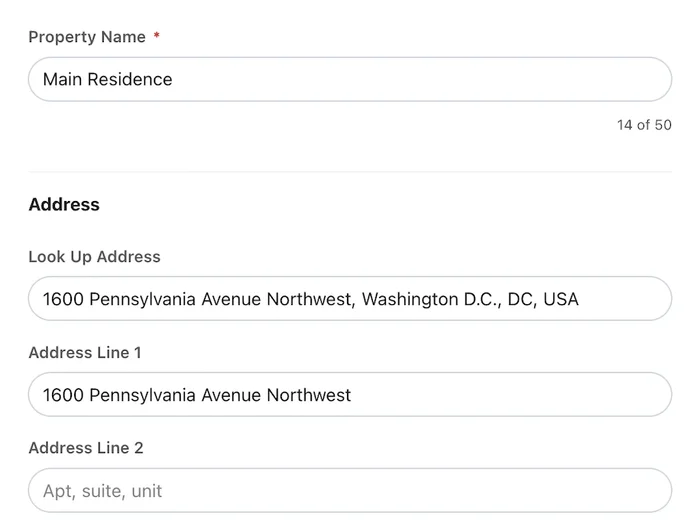
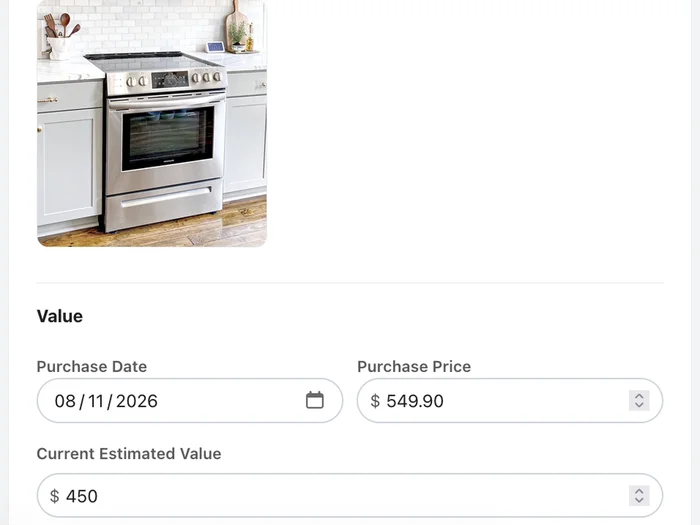
After a fire, flood, or theft, an insurer asks for a list of everything that was lost, and most people cannot produce one. Home Asset Vault is built to make that list while nothing is wrong: add a property, walk through each room, log the item, the price, and a photo, and keep going.
The product is deliberately narrow. Everything is entered by hand, with no AI photo scanning and no guessing, so the record is accurate and the owner controls it. Maintenance trackers, room scans, and the other extras that similar apps pile on are left out on purpose.
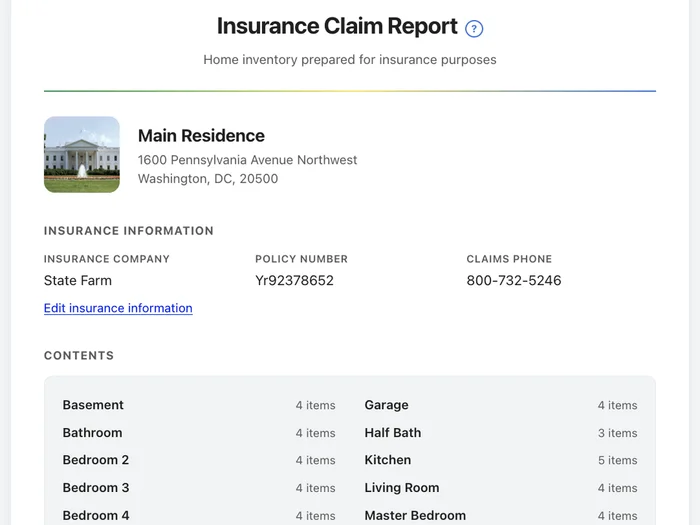
Nine printable reports come from the same inventory, including the Insurance Claim Report on every plan, a receipts packet for an adjuster, and an estate report that shows who each item is assigned to. Reports are ordinary web pages with print styling, so saving a PDF is just the browser's print command.
The design is clean and app-like: white surfaces, a confident green, and blue, yellow, and orange accents in a system font stack that loads fast and feels at home on a phone.
How it works, in three screens
The flow is the same one the home page promises: add a property, log items room by room, and print a report when it is needed.
Decisions that shaped it
Most of the work was deciding what to leave out. These choices are why the app stays small.
Manual entry on purpose
The owner enters each item, so the record is theirs and nothing has to be double-checked against an algorithm's guess.
No passwords
Sign-in is Google or a one-time email link that expires in 15 minutes. There is nothing to reset and nothing to forget.
Limits that never lock you out
Plan limits are enforced on the server, and a limit only blocks adding more. Viewing and editing what you already have always works.
Reports are web pages
Reports use print styling, so saving a PDF is the browser's own Print command. There is no PDF library to maintain.
Photos shrink before upload
Images are compressed in the browser first, which keeps uploads fast on a phone.
Deleting is self-service
Account deletion is a button in Settings. It removes everything, including stored photos, and cancels any active subscription.
Where to look
The marketing pages are public, and the app itself sits behind a free account.
Plans and Pricing
The Free and Pro plans side by side, with the limits and the reports listed for each.
Help Center
Step-by-step articles for getting started, photos and receipts, billing, and each of the nine reports.
Reports Overview
All nine reports in one table, with the situation each one is for and which plan unlocks it.
Privacy and Security
Plain answers on where data is stored and what is never done with it.
How it is built
This is a full web application, and the stack stays as small as it can be.
Sign-in uses Google or a one-time email link, so there are no passwords to store or reset. Billing runs through Stripe, and a webhook keeps each account's plan in step. Plan limits are enforced on the server, so a limit only ever blocks adding more, never viewing or editing what you already have. A scheduled Worker handles background jobs.
- Hosting Cloudflare Pages with Pages Functions
- Front End Semantic HTML5, hand-coded CSS, vanilla JavaScript, no framework
- Sign-In Google or a one-time email link, with no passwords
- Billing Stripe, with webhooks and a billing portal for cancelling
- Storage Cloudflare D1 for records and R2 for private photos
- Documentation A help center of plain pages, plus llms.txt for AI readers
Related projects
Another project with a database behind it, built the same way.